

Struggling with weak WiFi signals in certain parts of your home? You’re not alone.
A WiFi extender can boost your connection, but only if you place it in the right spot. Put it too far from your router, and it won’t work. Place it too close, and you’re wasting its potential. You’ll discover exactly where to put your WiFi extender to get the strongest, fastest signal possible.
Keep reading, and say goodbye to dead zones for good.
Ideal Extender Locations
Finding the ideal location for your WiFi extender can make a huge difference in your internet speed and coverage. Placing the extender in the right spot helps maintain a strong connection between your router and the areas where you need better signal. Let’s look at some practical locations that often work best to boost your WiFi effectively.
Near The Router
Placing your extender too far from the router can cause the signal to weaken before it even reaches the device. Positioning the extender near the router ensures it receives a strong, stable signal to amplify. If you’ve ever tried setting up an extender only to find it barely improved your WiFi, this is usually why.
Try placing the extender within the same room or one room away from your router. This gives it a solid signal to work with while still extending coverage to farther areas in your home.
Midway Points
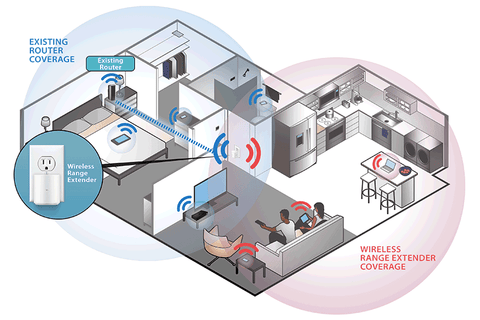
Think about the areas in your home where the WiFi signal starts to drop off. Placing the extender roughly halfway between your router and these weak spots can help fill the gaps. This location strategy helps the extender catch a decent signal and push it further.
For example, if your router is in the living room and your bedroom WiFi is weak, position the extender in the hallway between these two rooms. This setup often balances signal strength and coverage effectively.
Avoiding Obstacles
Walls, metal objects, and large furniture can block or weaken WiFi signals. You should avoid placing your extender behind thick walls, inside cabinets, or near microwaves and cordless phones. These obstacles can cause frustrating drops in connection quality.
Look for open spaces or corners that are free from heavy obstructions. Even small changes, like moving the extender to a higher shelf or a different wall, can improve your connection dramatically.

Credit: www.amazon.com
Factors Affecting Signal
Understanding the factors that affect your WiFi extender’s signal is key to placing it where it can perform best. Several physical and electronic elements can weaken or block the signal, reducing your internet speed and reliability. Let’s look at what you need to consider to avoid common pitfalls and get the most out of your extender.
Walls And Floors
Walls and floors are some of the biggest obstacles to a strong WiFi signal. Thick concrete or brick walls absorb signals more than drywall or wood. If your extender is placed behind a thick wall or under a floor, the signal strength will drop significantly.
Think about your home layout. Is there a solid wall between your router and the extender? Moving the extender closer to an open doorway or stairwell can help signals pass through easier. You might also notice that signals travel better on the same floor rather than between floors.
Electronic Interference
Other electronic devices can interfere with your WiFi signal without you realizing it. Microwaves, cordless phones, and baby monitors often operate on the same frequency as your WiFi. This overlap causes signal interruptions and slows down your connection.
Have you ever noticed your internet lag when the microwave is running? Placing your extender away from these devices reduces interference. Try to keep it at least a few feet away from any electronics that could disrupt the signal.
Distance Limitations
WiFi signals weaken over distance. Even the best extender can’t boost a signal that’s too weak to begin with. If the extender is placed too far from the main router, it won’t have a strong signal to repeat.
Ask yourself: Is your extender within a reasonable range of the router? A good rule of thumb is to place it where you still have at least 30-40% signal strength. This ensures your extender has enough power to send a strong signal to other areas of your home.
Tools To Measure Signal Strength
Finding the best spot for a WiFi extender depends on understanding your current signal strength. Tools that measure WiFi signal strength help identify weak areas and strong zones. These tools are easy to use and offer clear insights. They guide you to place the extender where it can boost your WiFi most effectively.
Wifi Analyzers
WiFi analyzers provide detailed information about your network. They show signal strength, channel usage, and interference levels. Many analyzers work on computers and laptops. These tools create heat maps that visualize weak and strong signal spots. They help you find the exact location where the extender will perform best.
Mobile Apps
Mobile apps offer quick and simple ways to check WiFi signals. They run on smartphones and tablets. These apps show signal bars, speed tests, and connection quality. Some apps highlight dead zones in your home. You can walk around with your phone and see real-time results. This method helps identify where the extender will fill coverage gaps.
Built-in Device Features
Many routers and extenders have built-in tools for signal testing. These features often include signal strength indicators or LED lights. They help you know if the device is getting a good connection. Some devices display signal quality through their apps or web interfaces. Using these built-in options makes it easier to place the extender correctly.
Credit: www.signalbooster.com
Placement Tips For Different Spaces
Finding the right spot for a WiFi extender improves internet reach. Different spaces need unique placement strategies to work well. Consider the layout and size of your area for best results.
Small Apartments
Place the extender near the center of your apartment. Avoid corners and walls that block signals. Keep it away from microwaves and cordless phones. Elevate the device on a shelf or table. This helps the signal spread evenly throughout the space.
Multi-story Homes
Position the extender halfway between the router and the weak signal area. Use a spot on the stairway or hallway for good coverage. Avoid placing the extender in basements or attics. Check for walls that may block signals. A higher location often works better than low spots.
Office Environments
Place the extender where many users connect to WiFi. Open areas work well, such as near desks or meeting rooms. Avoid metal cabinets and thick walls that block signals. Keep the extender away from electronic devices. Use multiple extenders if the office is large or has many walls.
Common Placement Mistakes
Placing a WiFi extender might seem simple, but many people make common mistakes. These errors reduce the extender’s performance and coverage. Avoiding these pitfalls improves your WiFi signal strength and speed.
Too Far From Router
Putting the extender too far from the router weakens its signal. The extender needs a strong connection to the router to work well. If it is too distant, it will only repeat a weak signal. Keep the extender halfway between the router and the area with poor signal.
Near Interference Sources
WiFi signals can be disturbed by other electronic devices. Placing the extender near microwaves, cordless phones, or baby monitors causes interference. This interference lowers the WiFi speed and reliability. Choose a spot away from devices that emit radio waves or electrical noise.
Obstructed Spots
Walls, furniture, and large objects block WiFi signals. Putting the extender behind thick walls or heavy furniture reduces its range. Avoid closed cabinets or places with many obstacles. Place the extender in an open area for the best signal distribution.
Alternative Solutions
If placing a WiFi extender feels like a puzzle with missing pieces, there are other ways to boost your home network. These alternative solutions can sometimes offer better coverage and fewer dead zones. Understanding these options helps you pick what fits your space and internet habits best.
Mesh Wifi Systems
Mesh WiFi systems use multiple devices that work together to create a single, strong network. Unlike extenders, they don’t just repeat the signal—they build it from the ground up. This means you get smooth coverage everywhere, even in tricky corners or large homes.
Setting up a mesh system is usually simple, with apps guiding you step-by-step. If you’ve ever struggled with your WiFi cutting out in the backyard or basement, mesh might solve that for good. Plus, it’s easy to add more nodes if you move or expand your home.
Powerline Adapters
Powerline adapters send your internet signal through your home’s electrical wiring. This is a clever way to avoid WiFi dead spots because it bypasses walls and floors that block wireless signals. Just plug one adapter near your router and the other where you want better coverage.
They work well if your home has good wiring and you want a quick fix without new cables. Have you noticed your WiFi slows down in a particular room? A powerline adapter might be the practical choice to fix that.
Upgrading Router
Sometimes, the best fix is to upgrade your router. Older models may not handle multiple devices well or cover larger areas efficiently. Newer routers come with stronger antennas and better technology to keep your connection fast and steady.
If your router is over five years old, it’s worth considering an upgrade. You might find that a new router alone improves your WiFi enough to skip extenders or other gadgets. What if the problem isn’t the placement but the device itself?
Credit: www.youtube.com
Frequently Asked Questions
Where Is The Best Spot To Place A Wifi Extender?
The best spot is halfway between your router and dead zones. Avoid walls and large metal objects. This ensures stronger signal coverage and reduces interference.
How High Should I Install My Wifi Extender?
Install the extender at a medium height, like on a shelf or table. Avoid placing it on the floor or too high near the ceiling for optimal signal spread.
Can A Wifi Extender Work Through Walls?
Yes, but walls can weaken the signal. Place the extender close to the wall nearest to your dead zone. Avoid thick walls or metal doors to improve performance.
Should I Place My Wifi Extender Near The Router?
No, placing it too close to the router limits its coverage area. Position it at a reasonable distance to extend the signal effectively into weak zones.
Conclusion
Place your WiFi extender where the signal is still strong. Avoid walls and metal objects that block signals. Choose a spot halfway between your router and the dead zone. This helps spread the signal evenly. Check the signal strength on your device after placement.
Move the extender if the connection feels weak. With the right spot, your WiFi will cover more space. Enjoy faster internet without dead zones. Simple steps can improve your home network. Keep testing until you find the best place.