

Are you ready to make your home smarter and simpler? Connecting your Amazon Smart Plug is easier than you think, and once set up, it can change the way you control your devices.
Imagine turning on your lights or coffee maker with just your voice or a tap on your phone. In this guide, you’ll discover step-by-step how to connect your Amazon Smart Plug quickly and effortlessly. Keep reading, and you’ll unlock the secret to smarter living in no time.
Amazon Smart Plug Features
The Amazon Smart Plug offers a straightforward way to control your home devices with just your voice or phone. It brings convenience and energy savings right to your fingertips. Understanding its features can help you make the most of this simple yet powerful gadget.
Easy Voice Control With Alexa
You can turn any device on or off using Alexa voice commands. No need to get up or find a remote. Just say, “Alexa, turn on the lamp,” and you’re done.
This hands-free feature is perfect for busy moments or when your hands are full. Have you ever tried controlling your lights without lifting a finger? It’s surprisingly satisfying.
Simple Setup And Compatibility
Setting up the Amazon Smart Plug is quick and doesn’t require technical skills. It connects seamlessly to your home Wi-Fi and Alexa app in minutes.
It works with most Alexa-enabled devices and fits into any standard outlet. This means you can easily add it to your existing smart home system without hassle.
Energy Monitoring And Savings
The plug helps track the energy usage of connected devices. You can see how much power your appliances consume and adjust accordingly.
Knowing your energy habits can lead to smarter usage and lower bills. Have you checked how much energy your devices actually use?
Scheduling And Automation
Set schedules to turn devices on or off automatically. This feature is great for routines like morning coffee or evening lights.
You can also create smart home routines combining multiple actions. Imagine your lights turning on and your favorite music starting as you walk in the door.
Compact Design And Portability
The plug’s compact design ensures it doesn’t block adjacent outlets. It’s small enough to fit discreetly behind furniture or appliances.
You can easily move it from room to room, making it versatile for different needs. Have you tried relocating your smart plug to control different devices?

Credit: www.amazon.com
What You Need Before Setup
Before setting up your Amazon Smart Plug, gather all essential items. This helps ensure a smooth and quick installation process. Knowing what you need saves time and avoids frustration.
Prepare your home network and devices to guarantee compatibility. A stable Wi-Fi connection and a compatible smartphone are crucial. Power source availability is also important for the plug to function.
Amazon Smart Plug Device
You need the Amazon Smart Plug itself. It is a small device that connects your appliances to Alexa. Make sure it is new or reset to factory settings before setup.
Stable Wi-fi Network
A strong 2.4 GHz Wi-Fi network is required. The plug does not support 5 GHz bands. Check your router settings and ensure the network is active.
Compatible Smartphone Or Tablet
Use a smartphone or tablet that supports the Alexa app. The app is available for iOS and Android devices. Keep your device updated to the latest software version.
Amazon Alexa App
Download and install the Amazon Alexa app on your device. The app controls the smart plug and manages its settings. Log in with your Amazon account to proceed.
Power Outlet Near Appliance
Locate a working power outlet near the appliance you want to control. The smart plug plugs directly into this outlet. Ensure the outlet is easily accessible for setup and use.
Step-by-step Setup Process
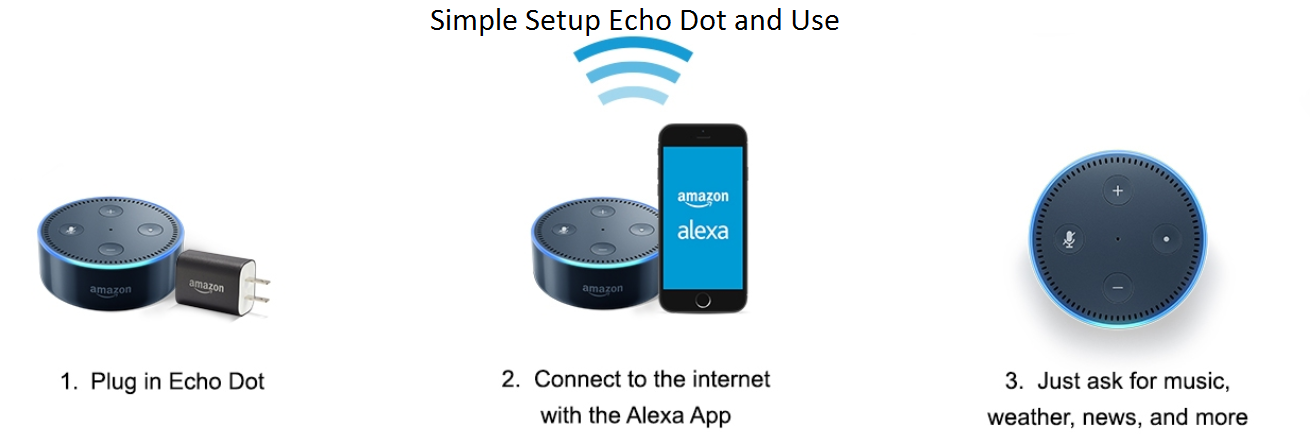
Setting up your Amazon Smart Plug is simple and fast. Follow each part to get your device working without trouble. This guide shows clear steps from plugging in to controlling with Alexa.
Plugging In The Device
First, find a power outlet near the appliance you want to control. Plug the Amazon Smart Plug directly into the outlet. Make sure it fits snugly and the outlet supplies power. The device will light up, showing it is ready for setup.
Downloading The Alexa App
Next, download the Alexa app on your smartphone or tablet. It is available on both Android and iOS platforms. Open your device’s app store, search for “Amazon Alexa,” and install it. After installation, sign in with your Amazon account or create a new one.
Connecting To Wi-fi
Ensure your phone is connected to the 2.4 GHz Wi-Fi network. The Amazon Smart Plug does not support 5 GHz networks. In the Alexa app, follow the prompts to connect the smart plug to your Wi-Fi. Enter your Wi-Fi password carefully to avoid errors.
Adding The Smart Plug In The App
Open the Alexa app and tap “Devices” at the bottom. Press the “+” icon to add a new device. Select “Plug” and then choose “Amazon” as the brand. Follow on-screen instructions to complete the connection. Once added, name your smart plug to control it easily by voice.
Credit: www.prwe.com
Troubleshooting Common Issues
Troubleshooting common issues with the Amazon Smart Plug helps keep your devices running smoothly. Many problems are easy to fix with simple steps. Understanding these fixes saves time and frustration.
Most issues relate to Wi-Fi, device responsiveness, or Alexa commands. Follow clear solutions to restore full functionality quickly.
Wi-fi Connection Problems
Check if your Wi-Fi is working properly. The Amazon Smart Plug needs a 2.4 GHz network, not 5 GHz. Make sure your router is close enough to the plug for a strong signal.
- Restart your router and the smart plug.
- Forget the Wi-Fi network in the Alexa app, then reconnect.
- Ensure your network password is correct during setup.
- Disable any network filters or firewalls that block new devices.
Device Not Responding
The smart plug might stop working due to power or software issues. Confirm the plug is firmly inserted into the outlet. Look for a solid green light indicating it’s on and connected.
- Unplug and plug it back in to reset.
- Use the Alexa app to remove and add the device again.
- Check for firmware updates in the Alexa app.
- Restart your phone or tablet controlling the device.
Alexa Voice Commands Not Working
Alexa may not understand commands for the smart plug. Ensure your Alexa-enabled device is nearby and online. Speak clearly and use simple commands like “Turn on the plug.”
- Verify the smart plug’s name in the Alexa app matches your command.
- Restart your Alexa device to refresh the connection.
- Check microphone permissions in your Alexa app settings.
- Try using the Alexa app to control the plug manually.
Tips For Optimizing Performance
Optimizing the performance of your Amazon Smart Plug ensures smooth and reliable operation. Small adjustments can improve connectivity and response time. Follow these tips to keep your device working at its best.
Position Your Smart Plug Near The Router
Place the smart plug close to your Wi-Fi router for a strong signal. Walls and furniture can block the signal and cause delays. A clear path between the plug and router helps maintain a steady connection.
Use A Dedicated Wi-fi Network
Connect the smart plug to a separate Wi-Fi network if possible. Avoid crowded networks with many devices. This reduces interference and improves the plug’s response speed.
Update The Device Firmware Regularly
Check for firmware updates in the Alexa app. Updates fix bugs and add new features. Keeping your plug up to date ensures better performance and security.
Limit The Number Of Connected Devices
Too many devices on the same network can slow down the smart plug. Disconnect unused devices to free up bandwidth. This helps the smart plug respond faster to commands.
Reset And Reconfigure If Issues Persist
If the smart plug acts slow or disconnects often, reset it. Unplug the device, then hold the reset button until the light blinks. Set it up again through the Alexa app to restore optimal function.
Using Alexa With Your Smart Plug
Using Alexa with your Amazon Smart Plug makes controlling devices easier and more fun. Alexa listens to your voice and acts on your commands. It helps automate your home without extra effort. You can control your smart plug hands-free, saving time and energy.
Alexa also allows you to create routines. These routines can trigger multiple actions with a single command. Setting schedules and voice commands becomes simple and convenient. This section explains how to use Alexa with your smart plug effectively.
Creating Routines
Routines let you control your smart plug along with other smart devices. Set a routine to turn on lights and start a fan together. Use the Alexa app to create and manage routines.
- Open the Alexa app and tap on “More.”
- Select “Routines” and tap the “+” sign.
- Choose a trigger, like a voice command or time.
- Add actions, such as turning your smart plug on or off.
- Save the routine and test it with Alexa.
Routines help you automate daily tasks easily and save energy.
Voice Control Commands
Alexa understands simple voice commands to control your smart plug. Speak clearly and use these common phrases:
- “Alexa, turn on the [plug name].”
- “Alexa, turn off the [plug name].”
- “Alexa, is the [plug name] on?”
- “Alexa, toggle the [plug name].”
Rename your smart plug in the Alexa app for easy control. Voice commands make managing your devices quick and hands-free.
Scheduling On And Off Times
You can schedule your smart plug to turn on or off at set times. This helps manage energy use and keeps your home secure.
- Open the Alexa app and go to “Devices.”
- Select your smart plug from the list.
- Tap “Schedules” and add a new schedule.
- Set the time and choose if the plug turns on or off.
- Save the schedule and repeat for other times if needed.
Scheduling automates your devices without any voice commands needed.

Credit: www.amazon.com
Frequently Asked Questions
How Do I Set Up My Amazon Smart Plug?
To set up your Amazon Smart Plug, plug it in and open the Alexa app. Follow the in-app instructions to connect the plug to your Wi-Fi network. Once connected, you can control the plug using Alexa voice commands or the app.
Can I Use Amazon Smart Plug Without Alexa?
No, Amazon Smart Plug requires the Alexa app for setup and control. It works best with Alexa-enabled devices for voice commands and automation. Without Alexa, you cannot fully utilize its smart features.
What Devices Are Compatible With Amazon Smart Plug?
Amazon Smart Plug is compatible with any device that plugs into a standard outlet. It works well with lamps, fans, and appliances. Ensure your Wi-Fi is 2. 4 GHz for optimal connectivity.
How Do I Reset My Amazon Smart Plug?
To reset, press and hold the button on the plug for 12 seconds. The light will flash orange, indicating a reset. After resetting, you can set it up again in the Alexa app.
Conclusion
Connecting your Amazon Smart Plug is simple and quick. Just follow the steps carefully. You can control your devices with voice or app. This makes your home smarter and more convenient. Enjoy the ease of managing your electronics anytime. Stay connected and save energy without hassle.
Start using your smart plug today for a better home experience.