

Are you tired of slow internet and weak WiFi signals in certain corners of your home or office? You’re not alone.
If your WiFi doesn’t reach every room, a WiFi range extender might be the simple fix you need. But how exactly does this device work to boost your connection? Understanding how a WiFi range extender functions can help you make smarter choices and enjoy stronger, faster internet where you need it most.
Keep reading, and you’ll discover how this small gadget can transform your online experience.
Basics Of Wifi Signals
Understanding the basics of WiFi signals helps explain how range extenders improve coverage. WiFi signals are invisible waves that carry data between devices and routers. These signals can weaken as they travel through walls or over distances. Knowing how WiFi works shows why signal strength matters for internet speed and reliability.
How Wifi Transmits Data
WiFi sends data using radio waves. These waves travel through the air at high frequencies. Devices like routers create these waves and send information to laptops, phones, or tablets. The data moves in small packets, quickly jumping from one device to another. Strong signals mean faster data transfer and better internet performance.
Common Signal Obstacles
Several things can block or weaken WiFi signals. Thick walls, metal objects, and floors reduce signal strength. Other electronics, like microwaves or cordless phones, can cause interference. Distance also plays a big role; the farther the device is from the router, the weaker the signal. These obstacles create dead zones with poor or no internet connection.
Credit: www.tp-link.com
Role Of Wifi Range Extenders
Wifi range extenders play a crucial role in improving your wireless internet experience. They help eliminate dead zones and bring a stronger signal to areas where your main router struggles to reach. Understanding how they work can help you decide if adding one to your home network makes sense.
What Range Extenders Do
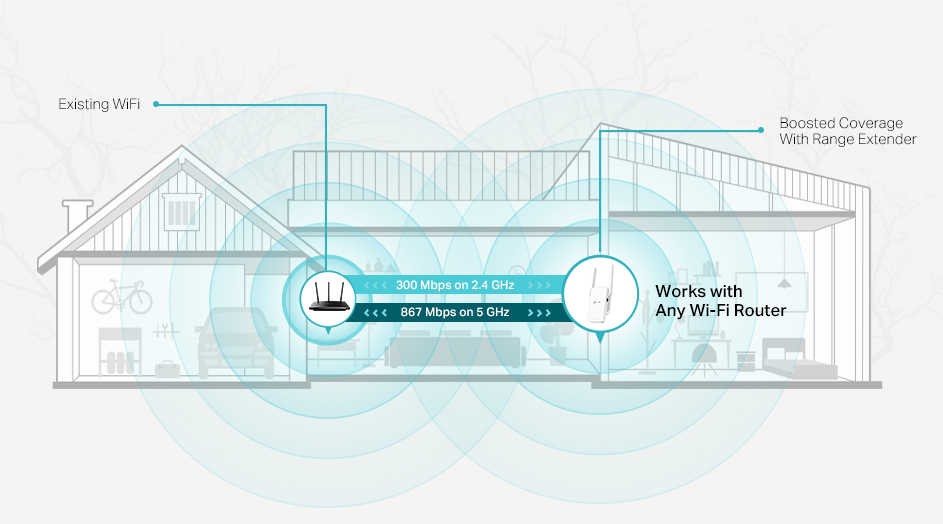
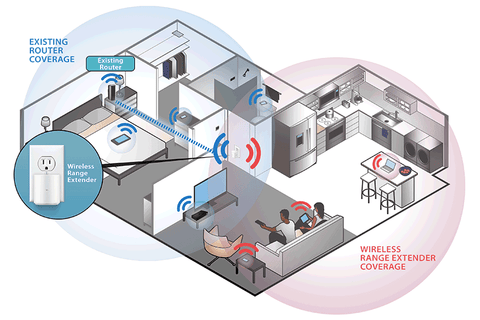
Wifi range extenders pick up the signal from your existing router and rebroadcast it to cover a wider area. This means that rooms far from your router can get a stronger, more reliable connection. Instead of replacing your router, extenders work alongside it to boost coverage.
Think about a time when your video call froze or your streaming stalled in a far corner of your house. A range extender can fix that by filling in the weak spots. They don’t create a new network but extend the one you already have, keeping your devices connected seamlessly.
Types Of Wifi Extenders
There are different types of wifi extenders designed to fit various needs and setups:
- Standard Wifi Extenders:These plug into a power outlet and rebroadcast your router’s signal, ideal for small to medium homes.
- Mesh Wifi Systems:More advanced, mesh systems use multiple nodes that communicate with each other to create a unified network with consistent coverage.
- Powerline Extenders:These use your home’s electrical wiring to transmit the internet signal, useful if wifi signals have trouble passing through thick walls.
Choosing the right type depends on your home layout and internet needs. Have you considered which spots in your home need better coverage? Pinpointing these areas can help you pick the best extender for your situation.
Signal Boosting Mechanism
Understanding the signal boosting mechanism of a WiFi range extender helps you see how it fills those frustrating dead zones in your home or office. It’s not magic—it’s a straightforward process of capturing, amplifying, and rebroadcasting the existing WiFi signal. Knowing this can guide you to make smarter choices about placement and troubleshooting.
Capturing The Original Signal
The extender first grabs the WiFi signal from your main router. Think of it as a middleman catching the broadcast before it fades away. If the extender is too far from the router, it struggles to catch a strong signal, which weakens everything that follows.
Amplifying And Repeating
Once the extender catches the signal, it boosts it by increasing the power or improving the signal quality. After amplification, it retransmits the enhanced signal to areas with poor or no coverage. This is why a good extender can dramatically improve your WiFi experience in hard-to-reach spots.
Placement For Best Performance
Where you put your extender makes all the difference. Ideally, it should be close enough to your router to get a strong original signal but far enough to reach the dead zone. Have you ever noticed better WiFi just by moving your extender a few feet? That’s the real power of smart placement.
Credit: www.signalbooster.com
Setup Process
Setting up a WiFi range extender is simple and quick. It requires just a few clear steps to boost your home internet signal. Follow the setup process carefully for a smooth experience and stronger WiFi in hard-to-reach areas.
Connecting To Your Router
Place the extender halfway between your router and the weak signal area. Plug it into a power outlet and turn it on. Use your computer or phone to find the extender’s network name (SSID). Connect to this network to start the setup.
Configuring The Extender
Open a web browser and enter the extender’s IP address or setup URL. You will see a setup page asking for your router’s WiFi details. Select your home WiFi network and enter its password. Save the settings to link the extender with your router.
Testing The Extended Network
Move to the area where you had a weak signal. Connect your device to the extended network name. Check the internet speed and signal strength. If the connection is strong and stable, the setup is successful.
Benefits Of Using Extenders
Wifi range extenders are a game-changer for anyone who struggles with weak signals at home or in the office. They are designed to amplify your existing wifi signal, ensuring that you stay connected no matter where you are. But what exactly are the benefits of using extenders? Let’s dive into how they can improve your internet experience.
Improved Coverage
Imagine being able to stream your favorite shows in the garden or download files while relaxing in your bedroom. Wifi range extenders expand the reach of your existing network, allowing you to connect from areas that were previously dead zones. They act as bridges, capturing the signal from your router and rebroadcasting it to those hard-to-reach spots.
Think of it as adding extra speakers to a sound system. The music is clearer and spreads more evenly throughout your space. With better coverage, you can move freely without worrying about losing connection.
Enhanced Speed In Dead Zones
Ever noticed how your internet speed drops to a crawl in certain parts of your home? Extenders can give those areas a much-needed speed boost. By strengthening the signal in dead zones, they ensure that your devices receive a consistent and fast connection.
This means fewer buffering screens and more seamless browsing or streaming. Whether you’re attending a virtual meeting or gaming online, you won’t have to deal with frustrating lag.
Have you ever found yourself moving your laptop around the room, hunting for a stronger signal? With a wifi range extender, those days are over. It’s like having a personal assistant dedicated to optimizing your wifi performance.
Limitations To Consider
Wifi range extenders can seem like a simple fix for weak signals, but they come with their own set of challenges. Understanding these limitations helps you set realistic expectations and avoid frustration. Let’s look at some key issues that might affect your experience with a range extender.
Potential Signal Loss
Range extenders work by receiving your existing wifi signal and rebroadcasting it. This process can reduce the overall speed and strength of your connection. You might notice slower internet speeds compared to being directly connected to your router.
Think about placing the extender too far from your router. The weaker the original signal it receives, the weaker the repeated signal will be. A good rule is to position the extender where the wifi is still strong enough to maintain decent speeds.
Compatibility Issues
Not all wifi range extenders work seamlessly with every router. Some extenders may not support certain wifi standards or security protocols your router uses. This can cause setup difficulties or unstable connections.
Before buying an extender, check if it supports your router’s frequency bands, like 2.4 GHz or 5 GHz. Also, verify compatibility with your router’s brand and model. Sometimes, using extenders from the same brand as your router can reduce compatibility headaches.
Alternative Solutions
Looking beyond WiFi range extenders can lead you to solutions that might better fit your home or office setup. These alternatives often provide more stable connections and cover larger areas without the common drop in speed you might face with extenders. Considering different options helps you tailor your network to your specific needs.
Mesh Wifi Systems
Mesh WiFi systems use multiple devices called nodes spread across your space to create a single, seamless network. Unlike extenders that repeat signals, mesh nodes communicate directly with each other, reducing dead zones and improving speed consistency. If you’ve ever walked from one room to another and lost signal, a mesh system can keep you connected without interruptions.
Setting up a mesh system is straightforward, often guided by an app that helps place nodes in optimal spots. This system suits larger homes or offices where walls and floors block signals. You get the flexibility to add more nodes as your space or device count grows.
Powerline Adapters
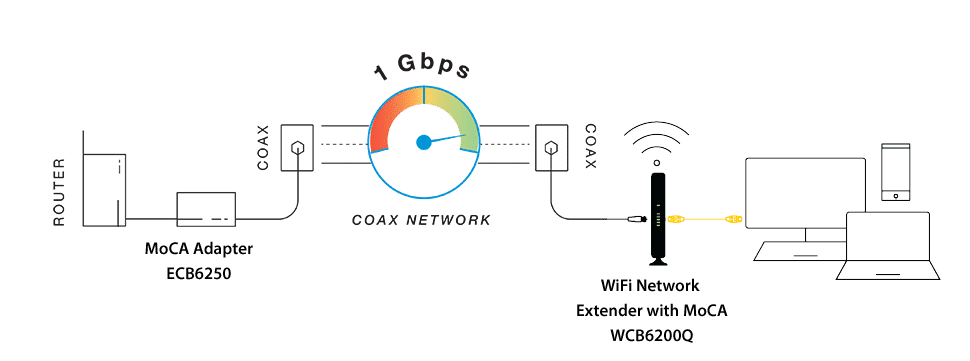
Powerline adapters use your home’s electrical wiring to carry internet signals. You plug one adapter near your router and another where you need better internet, effectively turning electrical circuits into network cables. This method avoids wireless interference and is great if WiFi signals struggle to penetrate thick walls.
These adapters are simple to install and usually work right out of the box. They provide a stable connection for devices like smart TVs or gaming consoles where a wired connection is preferred but running Ethernet cables isn’t practical. Have you checked if your home wiring is compatible? That’s a key step before investing.
Credit: www.screenbeam.com
Frequently Asked Questions
What Is A Wifi Range Extender?
A WiFi range extender boosts your existing wireless signal. It captures your router’s signal and rebroadcasts it. This helps cover dead zones and expands your WiFi reach. It’s ideal for larger homes or areas with weak connections.
How Does A Wifi Range Extender Improve Signal?
It receives the router’s WiFi signal and amplifies it. Then, it retransmits the stronger signal to distant areas. This reduces dead zones and improves coverage. The extender acts as a bridge between your router and devices far away.
Where Should I Place A Wifi Range Extender?
Place it halfway between your router and the area with weak signal. Ensure it still receives a strong router signal. Avoid walls or obstacles that block signals. Proper placement maximizes coverage and connection speed.
Will A Wifi Extender Reduce My Internet Speed?
A WiFi range extender may slightly reduce speed due to signal rebroadcasting. However, it improves connectivity in weak areas. Using dual-band extenders can minimize speed loss. Overall, it enhances your internet experience in dead zones.
Conclusion
A WiFi range extender helps spread your signal farther. It captures your router’s WiFi and rebroadcasts it. This boosts coverage in spots with weak or no signal. Setting up an extender is usually quick and easy. It creates a stronger connection for your devices.
With better WiFi, you can browse, stream, and work smoothly. Extenders are a smart choice for bigger homes or offices. They keep you connected without needing new cables. Now, you understand how they improve your WiFi experience. Simple, effective, and useful for better internet around you.